


Home
NextSaaS
NextSaaSNextSaaS
  • Home
  • Features
    • Patient Registration & IC Scanning
    • Online Appointment Booking
    • Billing & LHDN e-Invoicing
    • Inventory & Medication
    • EMR & Consultations
    • MCs, Documents & Labels
    • Queue Management
    • Analytics & Reports
    • Staff Management
    • Multi-Branch Management
    • Cloud & Security
    • WhatsApp Reminders
    • View All Features →
  • Pricing
  • FAQs
  • Blog
  • Contact Us
  • Clinic Tools
    • BMI Calculator
    • Blood Pressure Checker
    • Calorie Counter
    • eGFR Calculator
    • Ideal Body Weight Calculator
    • Medication Dosage Calculator
    • Pregnancy Due Date Calculator
Get started
Home
NextSaaSNextSaaS
  • Home
  • Features
    • Patient Registration & IC Scanning
    • Online Appointment Booking
    • Billing & LHDN e-Invoicing
    • Inventory & Medication
    • EMR & Consultations
    • MCs, Documents & Labels
    • Queue Management
    • Analytics & Reports
    • Staff Management
    • Multi-Branch Management
    • Cloud & Security
    • WhatsApp Reminders
    • View All Features →
  • Pricing
  • FAQs
  • Blog
  • Contact Us
  • Clinic Tools
    • BMI Calculator
    • Blood Pressure Checker
    • Calorie Counter
    • eGFR Calculator
    • Ideal Body Weight Calculator
    • Medication Dosage Calculator
    • Pregnancy Due Date Calculator

All guides

  • Getting Started
  • Consultations
  • Appointments
  • Patients
  • Billing & Payments
  • E-Invoicing (LHDN)
  • Inventory (Medications)
  • Services
  • Queue & Display
  • Staff
  • Settings
  • Dashboard & Reports
Home-User Guide-Patients

Patients

Register and manage patients, including IC/passport scanning with automatic data capture, patient records, history, and tax profiles for e-invoicing.

The Patients module is your central record of everyone your clinic sees. From here you register new patients, search existing ones, and open a complete history of their visits, prescriptions, bills, and documents.

Registering a patient

You can register a patient from the Patients module, or on the fly while creating a consultation or appointment.

Fill in the registration form:

FieldNotes
First name / Last nameThe patient's name.
IC / PassportThe patient's identity number. Used to detect duplicates.
GenderRequired.
Date of birthRequired.
Contact numberFor reminders and confirmations.
EmailFor confirmations and receipts.
NationalityChoose from the country list.
Height (cm) / Weight (kg)Optional clinical details.
AddressHouse number, street, postcode, and state.
Allergies / ConditionsImportant safety information shown during consultations.

Click Register to save. If a patient already exists with the same IC or passport number, EazyClinic warns you instead of creating a duplicate — search for the existing record instead.
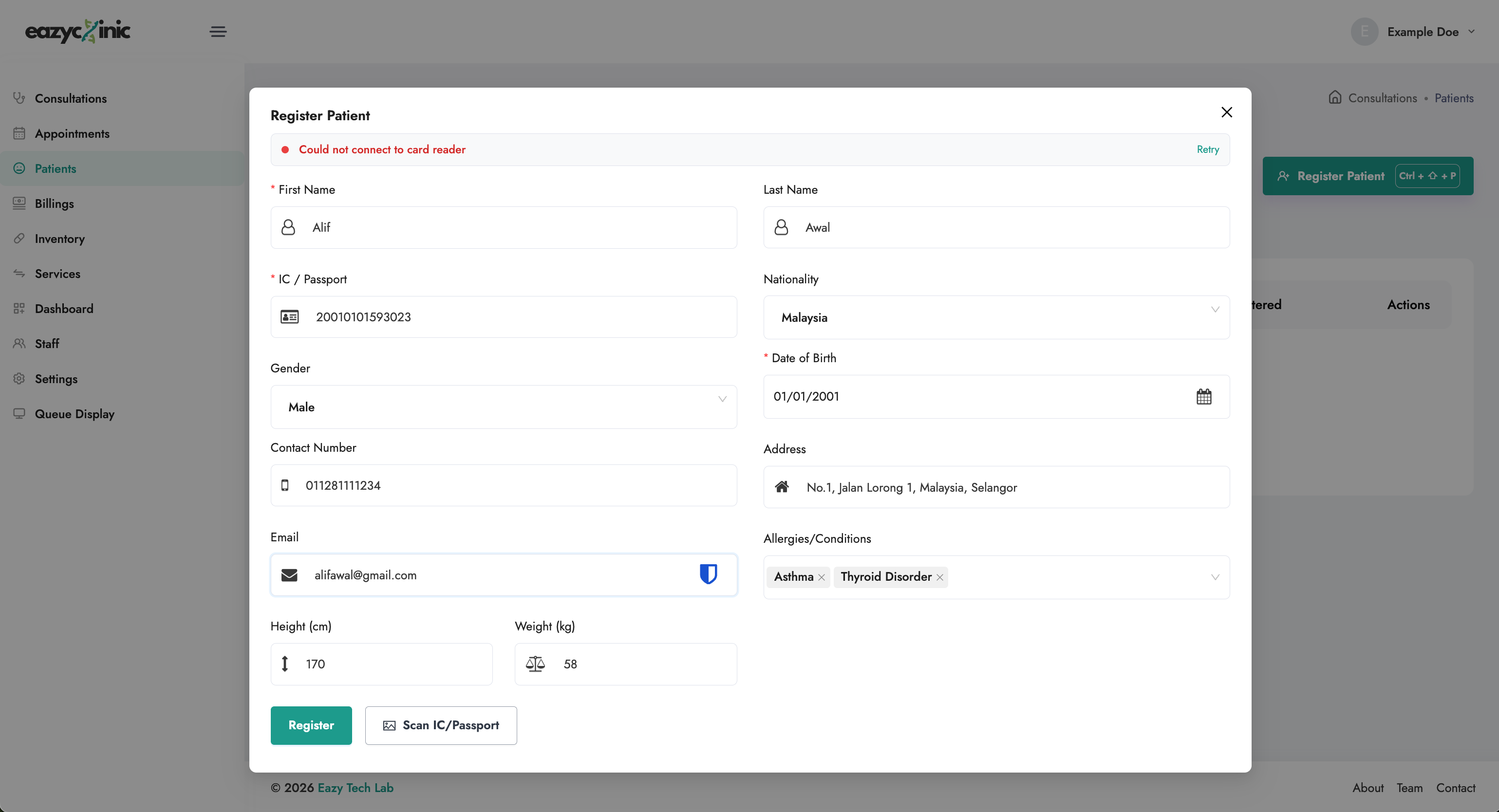
Patient registration form

Scan an IC or passport (automatic capture)

To save typing, click Scan IC / Passport and capture an image of the patient's document. EazyClinic reads the document and fills in details such as name, date of birth, gender, ID number, and nationality automatically. Review the captured details for accuracy, then complete any remaining fields and save.

Finding a patient

Use the search on the Patients list to find someone by name or ID. Open a record to see their profile.

The patient record

A patient's profile brings their whole history together in one place:

  • Overview — key details and contact information.
  • Consultations — every past visit.
  • Prescriptions — medication history.
  • Billings — past bills and their payment status.
  • Documents — medical certificates, letters, and other generated documents.

From the record you can edit the patient's details or delete the record if needed.
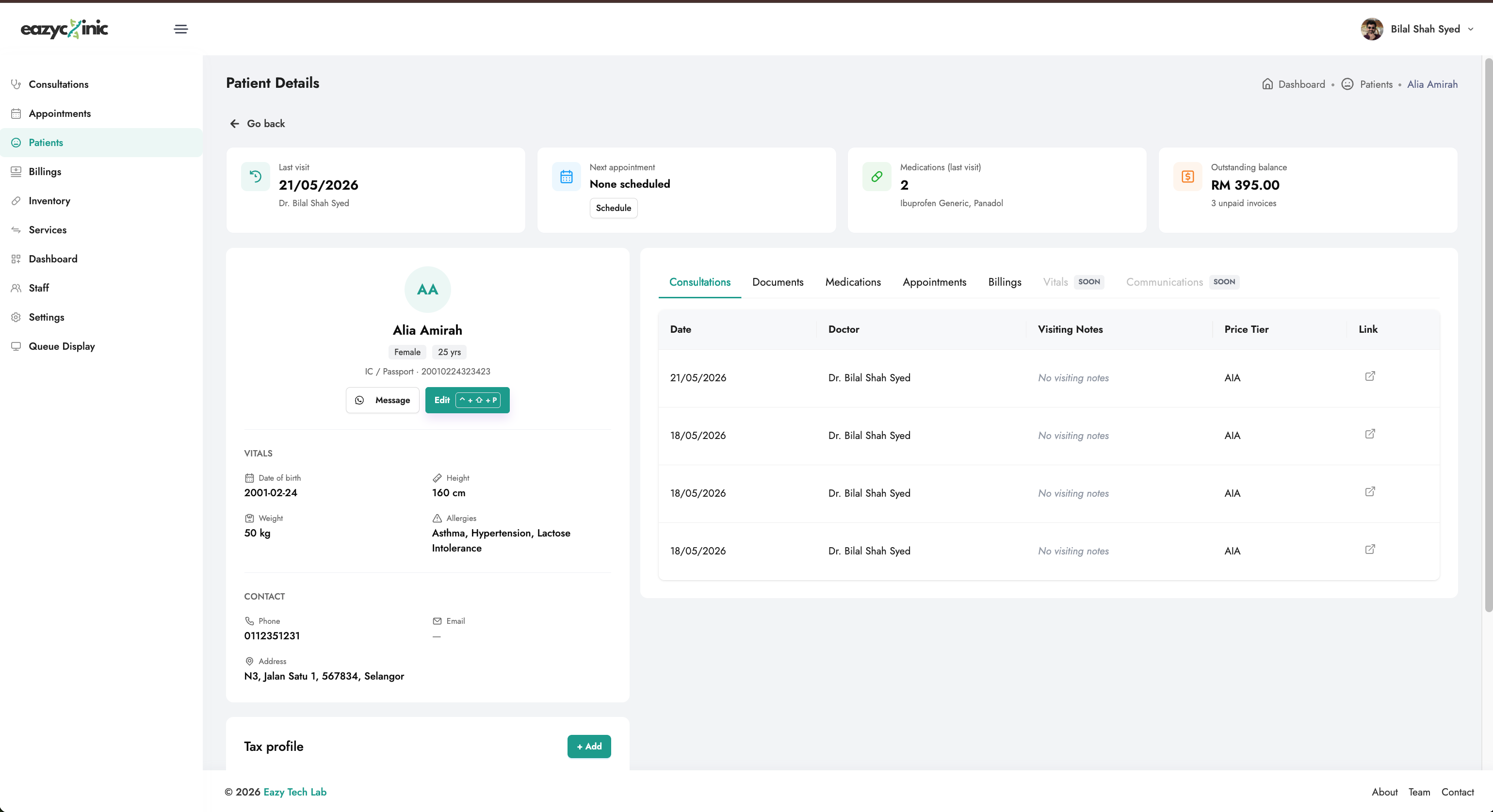
Patient profile with history tabs

Tax profiles (for e-invoicing)

If you issue LHDN e-invoices to a patient (or to the company or insurer paying on their behalf), you can store one or more tax profiles on the patient record. A tax profile holds the buyer's billing details so they're ready to attach when you submit an e-invoice.

See the E-Invoicing guide for how these are used.

Related guides

  • Consultations — seeing the patient.
  • Appointments — booking the patient in advance.
  • Billing & Payments — charging the patient.
  • E-Invoicing (LHDN) — issuing compliant e-invoices.

Related features & reading

  • Feature: Patient Registration
  • Blog: Digital Patient Registration in Malaysia: The Front-Desk Upgrade
PreviousAppointments
NextBilling & Payments

Guide assistant

Ask me anything about these guides

Ask about the EazyClinic guides

Describe how your clinic works and I'll point you to the parts that cover it.

See how EazyClinic works for your clinic

Book a short walkthrough to see how EazyClinic simplifies patient registration, consultations, billing, and documentation for your clinic.

Schedule a Demo
[object Object] icon
Chat on WhatsApp

Free data migration · Guided setup · No lock-in

NextSassNextSass

EazyClinic is a clinic management software platform designed for private clinics in Malaysia.

Business addressJalan Jelatek, Kementah, 54200, Kuala Lumpur, Malaysia
Facebook
Instagram
Youtube
LinkedIn

Company

  • Contact Us

User Guide

  • Getting Started
  • Consultations
  • Appointments
  • Patients
  • Billing & Payments
  • All Guides

Support

  • FAQ
  • Clinic Tools

Legal Policies

  • Terms & Conditions
  • Privacy Policy
  • Refund Policy

Copyright ©EazyTech Labs – Solutions for Modern Clinics. All Rights Reserved.